Privacy and data controls
Understand what is captured, what remains, and what the available controls change.
Sales Copilot captures microphone and system audio for live assistance. Live audio leaves the device for the backend and configured speech-recognition provider. Rehearsal captures your microphone to understand your spoken responses.
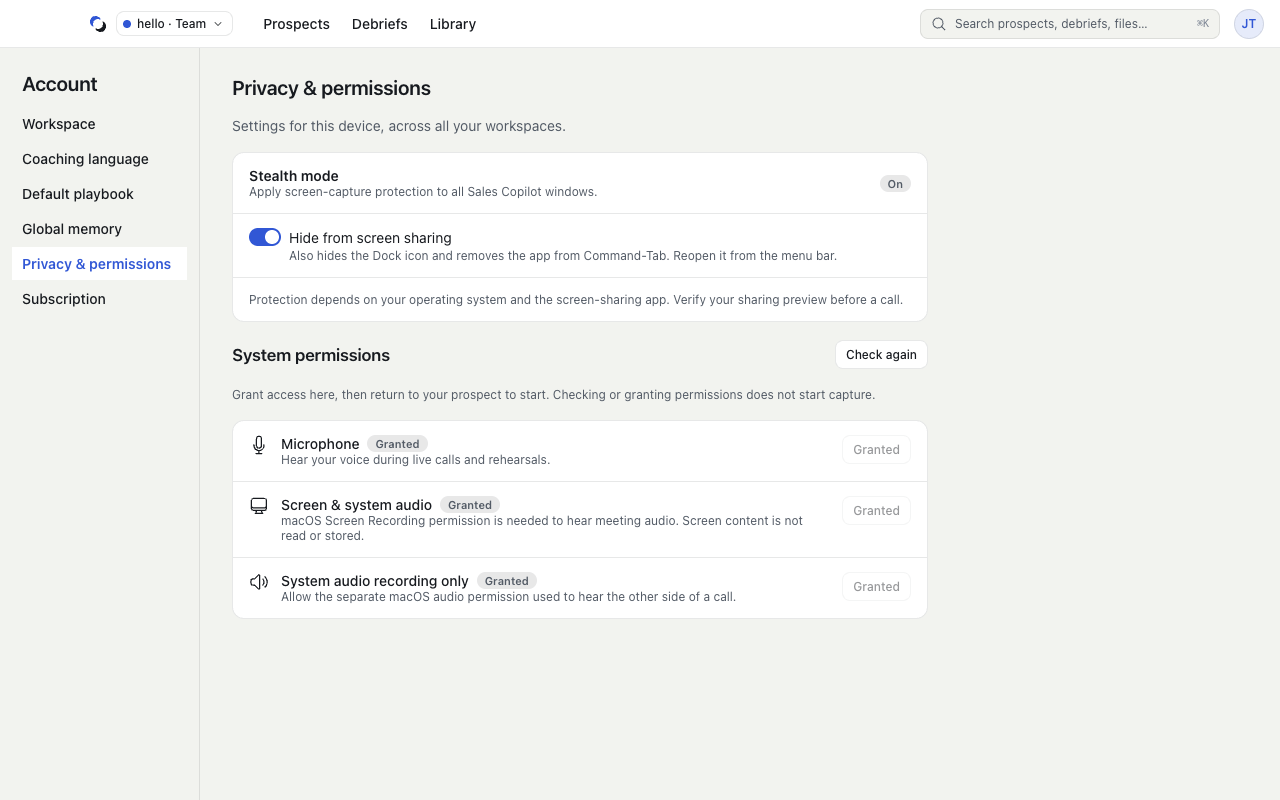
The product does not store raw audio, recordings, screenshots, screen video, or screen pixels. Screen understanding is not a product feature. On macOS the app needs only the System Audio Recording permission, not Screen Recording.
What remains after a Session
Structured Session data includes events, transcripts, debriefs, and derived coaching memory. It has no automatic expiry by default. Do not assume ending a call, hiding the cockpit, or clearing memory deletes the Session's transcript or Debrief.
Current deletion controls do not yet cover the entire structured-data lifecycle. Configurable Team retention enforcement is not yet available.
Controls you can use
- Account → Privacy & permissions controls device permissions and screen-share protection: Hide Sales Copilot from screen share and the Dock on macOS, Hide Sales Copilot from screen share on Windows. Protection depends on the operating system and sharing app; check the sharing preview.
- A Prospect's Memory tab offers individual Forget controls.
- Account → Global memory → Reset… clears global and Prospect memory in the current workspace after confirmation. Debriefs remain.
- Library archive confirmations explain how an owned file or Playbook becomes unavailable for future use.
- Web workspace settings expose permitted offboarding and deletion actions, with progress checks when cleanup is pending.
New materials and Playbooks are private until explicitly shared. Live guidance is private to the rep. Personal Sessions stay Private; new Team Sessions default to Shared with their author and that Team's current owner/admin. The author can choose Make private before starting or change Access in the Debrief later.
Shared review exposes the completed conversation, safe scores, and Team feedback. It does not expose the full personal Debrief, preparation, private guidance, or memory, and it does not let a reviewer watch an ongoing Session. Switching to Private removes Team review access without deleting the Session or its stored feedback. These controls are available in the development product; production acceptance remains pending.
Your organization is responsible for applicable notice and consent obligations. Sales Copilot does not collect consent from other people or provide participant revocation controls.
Reviewed October 28, 2026