Sales Copilot documentation
Get on-screen answers during live sales calls. Prepare the context, practice, and learn for the next call.
Sales Copilot shows on-screen answers during live B2B sales calls. The cockpit puts one answer in front of you at a time: a line to say, up to two supporting points, and an optional question to ask back. A Prospect supplies context for those answers, rehearsal helps you practice difficult questions, and each Session's Debrief helps you prepare for the next call.
About this guide
Screenshots show the desktop interface with fictional example data; their capture dates are separate from each article's review date.
Find your way around
Your first live call
Get help during the call
Practice before the call
Resolve a problem
The desktop has three destinations. Calls is home: your upcoming meetings, recent Sessions, and All sessions, where every Debrief lives. Prospects is where you prepare each pursuit. Library holds reusable files and Playbooks. Start a call in the top bar works from anywhere. Open your avatar for Account, including workspace settings, language, default Playbook, memory, privacy and permissions, and subscription.
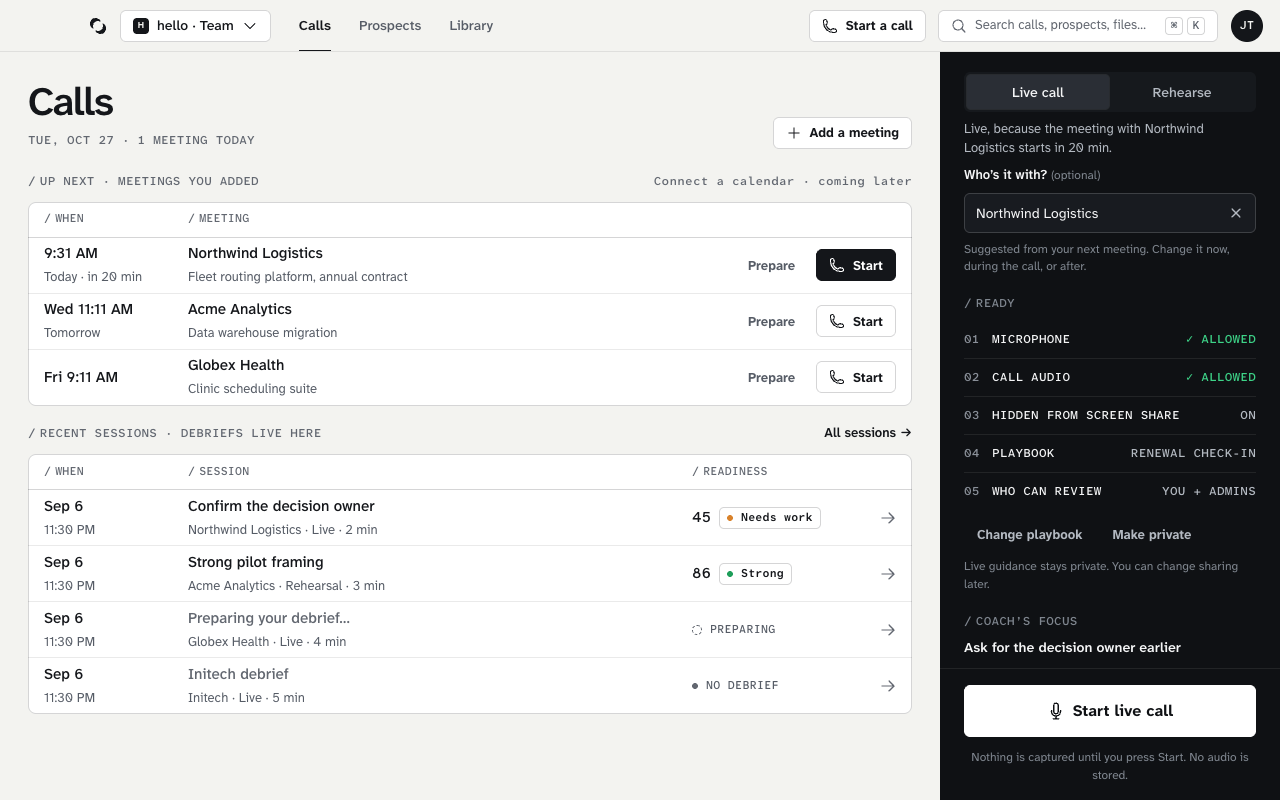
One pursuit, several conversations
A Prospect carries context between conversations. A Session records one live call or rehearsal. Materials give the copilot source information for its answers; a Playbook shapes how it answers. The Account Action Plan captures the working plan, and coaching memory carries lessons into the next call.
Desktop and web
Use the desktop for calls, preparation, rehearsal, and review. The website handles sign-in and workspace management. In the development product, Team owners and admins also use the web to review completed Shared Sessions and publish feedback. A Personal workspace and a Team stay separate when you switch between them.
Reviewed October 28, 2026