Prospects and Sessions
Understand the durable pursuit and the individual conversations attached to it.
A Prospect is the pursuit you are working on. It holds the company, your offering, the conversation goal, context, preparation, session history, and coaching memory. Keep returning to the same Prospect while that pursuit continues.
A Session is one live call or rehearsal. Every Session belongs to exactly one Prospect. Ending a Session leaves the Prospect available for the next conversation.
You do not have to create a Prospect first. A call started with Who’s it with? left empty belongs to a temporary untitled Prospect. After the call, its Debrief lets you Create prospect to name it or Attach to existing to move the Session into a Prospect you already have. Untitled Prospects stay out of the Prospects list.
The four Prospect tabs
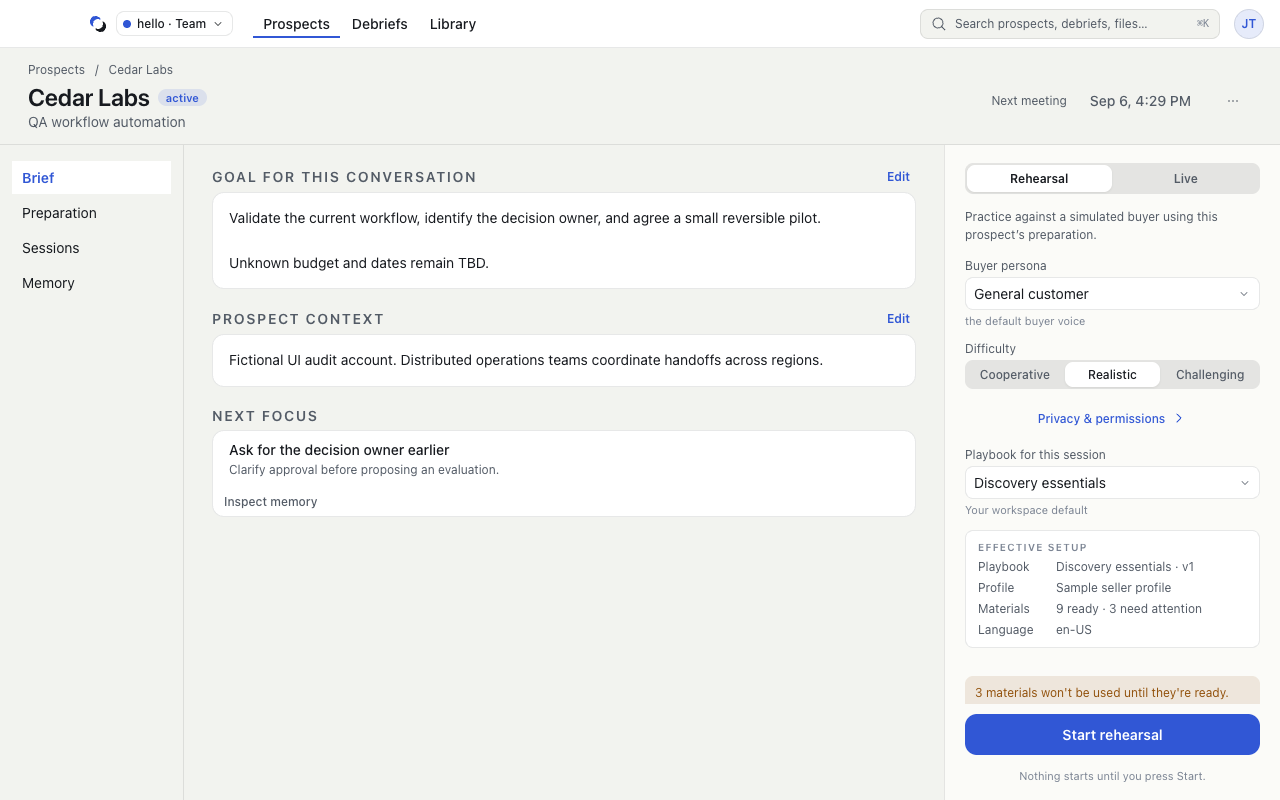
- Brief contains the conversation objective, counterpart context, and any available Next focus. For Selling, the fields are Opportunity brief and Account context. Edit individual fields in place.
- Preparation selects the Playbook, Your profile, and attached materials that help ground the conversation.
- Sessions lists the conversations for this Prospect and their debrief status.
- Memory shows coaching patterns, supporting evidence, and the next practice focus.
The tabs sit under the Prospect's header, and the launch rail stays beside them. Its Ready rows summarize capture permissions, screen-share protection, materials, and the Playbook before you start.
What a Session keeps
The setup is resolved at launch. A session-specific Playbook override does not change the Prospect setting, and changing a Playbook later does not rewrite an earlier Session's copy. Prepare changes before starting the next Session.
After a Session, its Debrief connects the outcome and coaching evidence back to the pursuit. Calls → All sessions provides the cross-Prospect list; the Prospect's Sessions tab keeps the same review contextual.
This guide uses the Selling workflow. Scenario selection is implemented in development; integrated provider and packaged-release acceptance across all three scenarios remains pending. A saved Session keeps the scenario resolved when it started. See Prepare a Prospect for the preparation workflow.
Reviewed October 28, 2026