Inspect and control coaching memory
Understand Prospect coaching patterns and your workspace-level facts and preferences.
Coaching memory connects what you learned from previous conversations to the next one. It is private to you in the current workspace. Personal and Team workspaces keep separate memory.
Prospect memory
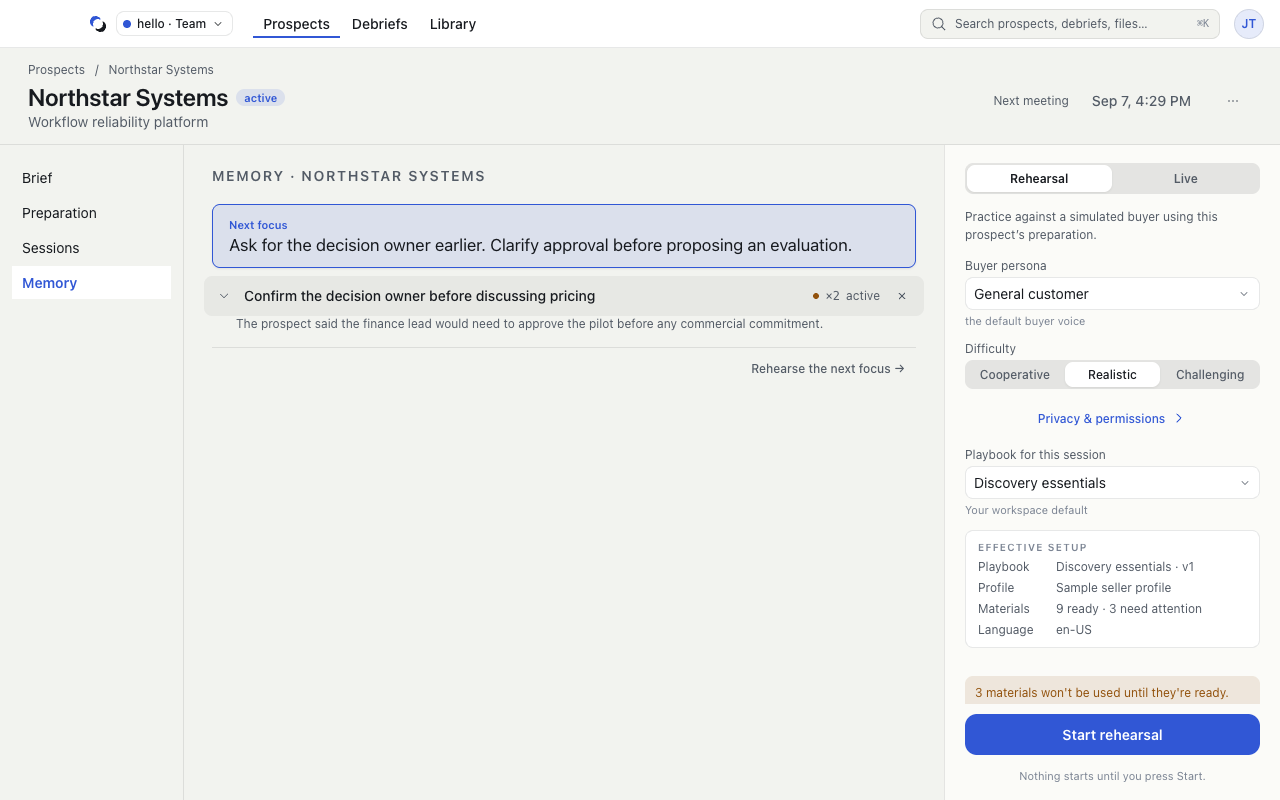
Open Prospects, then your Prospect's Memory tab. This view can show Next focus, recurring practice opportunities, strengths, style notes, and readiness history. Expand a coaching claim under practice opportunities, strengths, or style notes to inspect its evidence. Use that row's Forget control to remove it.
When a next focus is available, Rehearse the next focus → selects rehearsal in the launch rail. Review the setup and press Start rehearsal when ready; opening this action does not start capture.
Prospect coaching memory is derived from debriefs. A new Prospect may have no memory yet, and a loading or retrieval error is not evidence that saved memory is empty.
Global memory
Open your avatar, choose Account settings, then Global memory. This contains facts and preferences supported by your own words within this workspace. Coaching patterns and next steps remain on each Prospect.
More calls do not guarantee a new fact. The system needs supporting statements; an empty view can be a valid result.
Reset the current workspace's memory
Reset… opens a confirmation explaining the scope. Acknowledge the checkbox and choose Reset memory only when you want to clear global memory and every Prospect's coaching memory in this workspace. This cannot be undone. Past debriefs remain available.
For a smaller correction, remove the individual claim instead of resetting everything. Memory removal is not deletion of the underlying Session or Debrief.
Reviewed October 28, 2026